
QuickBooks
integration.
We connect QuickBooks Online or Desktop to one database you own, so reports cover the whole business, and we build the automations that post the entries you type today. Seamless workflows in and around your financial source of truth.
Why your QuickBooks integration keeps turning into a spreadsheet.
QuickBooks is the system of record for money, and it is good at that. It is not where the work happens. Hours are logged in the field, estimates live in the CRM, and the job's materials sit in a sheet, so at period end someone carries all of it into the books by hand and reconciles the differences. Out-of-the-box connectors get part of the way: they move a customer or an invoice, but a journal entry that has to land on the right account, class and cost center needs the API called exactly, which is where the generic connector gives up and the spreadsheet comes back.
Field to books.
Time and materials are re-keyed at period end, so labor cost is a month late.
CRM to books.
The same customer exists twice, and the invoice that was already paid shows open in one of them.
Reports stop at QuickBooks.
Margin by job or by rep needs data QuickBooks never sees.
QuickBooks integration services: Online, Desktop, and the rest of your systems.
We load QuickBooks into the AI-Ready Data Warehouse, a database on your own cloud account, beside your field app, CRM and spreadsheets. QuickBooks Online has a ready-made connector, so it is the fastest and most affordable place to start. QuickBooks Desktop is on-premises, so it connects through a gateway we set up on your network. Either way your books stay where they are, and every row in the warehouse links back to the record in QuickBooks it came from. From there, reports cover the whole business, and your AI assistant can answer "which jobs lost money last month, and are those customers paid up" from QuickBooks and the operations data together.
QuickBooks Online.
Class A connector. Ready-made, loaded on a schedule, the fastest and most affordable place to start.
QuickBooks Desktop.
Class C connector. On-premises, so it connects through a gateway we set up on your network. We have set this up for other clients.

QuickBooks automation that posts the right entry to the right account.
Writing to QuickBooks is a deliberate build: an automation that takes one event, an approved timesheet, a closed job, a signed estimate, and creates or updates exactly what it should in the books through the QuickBooks API, formatted the way your chart of accounts expects. Out-of-the-box QuickBooks connectors in tools like Zapier or n8n exist, and for a simple customer sync they are fine, but a journal entry that maps each amount to its account needs fine-grained control of the API call. We write that step as code, in n8n or Apps Script, test it against your real accounts, and run it on an instance you own. The same team builds the rest of your workflow automation.
Labor cost to the ledger.
Approved timesheets become one journal entry per period, mapped to the right cost centers. Our published blueprint. Read the blueprint →
Estimate to invoice.
The signed estimate in your CRM or field app becomes the QuickBooks invoice, with the customer created or matched first.
Bills from the inbox.
A vendor PDF becomes a bill with the right vendor, account and line items, queued for a person to approve.
Payments back to the job.
A payment recorded in QuickBooks updates the job and the customer record in the systems your team actually works in.
TIME TRACKER APP → COST-CENTER MAPPING → LABOR COST PER PERIOD → JOURNAL ENTRY POSTED TO THE GENERAL LEDGER
Our blueprint for QuickBooks labor costing is written up in full: How to automate QuickBooks labor costing.
QuickBooks reporting that doesn't stop at QuickBooks.
QuickBooks custom reports can only report on what is in QuickBooks. Once the books sit in a SQL database next to jobs, hours and customers, the reports you actually want become ordinary queries: margin by job, revenue by rep, AR aging by project manager, labor cost by cost center this period against last. Google Cloud SQL or Supabase PostgreSQL for most businesses; BigQuery for very large volumes. One dashboard is included in Foundation, and your AI assistant runs the same queries through the MCP server.
Which jobs closed below cost last month?
Who sold them?
Are those customers paid up?
What a QuickBooks integration costs.
Connecting QuickBooks is priced as part of the AI-Ready Data Warehouse, and that price sheet is public: a fixed Foundation fee that includes connector points, with QuickBooks Online and QuickBooks Desktop each priced by class. The full price sheet is on the warehouse page. Automations are scoped to your process on the call.
QuickBooks, connected, in a plant that runs on it.
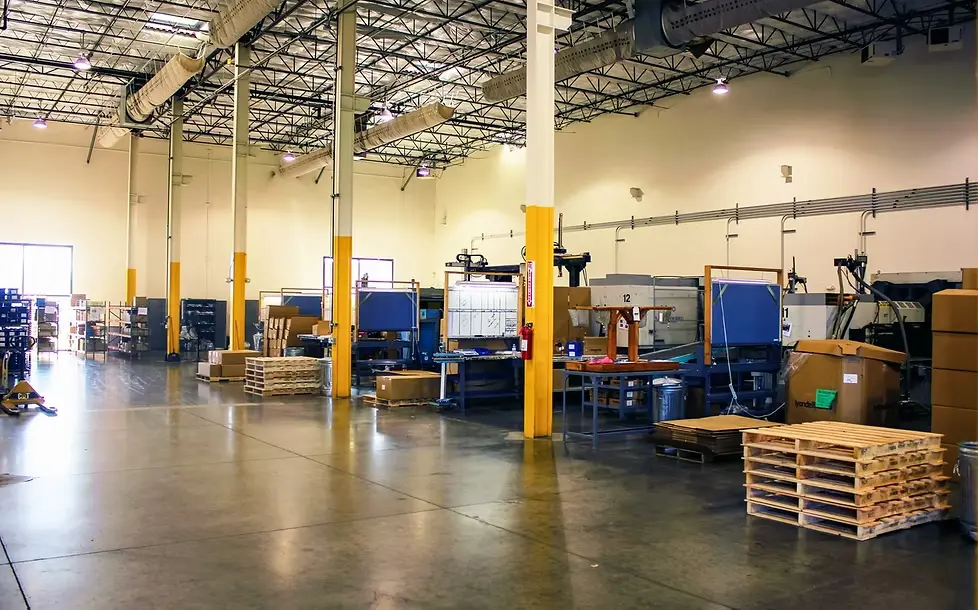
From spreadsheets to scale — $1M risk mitigated.
A 50-column shipment spreadsheet ran the whole facility. RAMKO's 17+ apps now run on a single source of truth, with QuickBooks in the stack.
How a QuickBooks integration with QREW starts.
Free QuickBooks call
Bring the systems QuickBooks has to talk to and the one report or entry that costs you the most time. We tell you connect, automate, or both.
Connect
QuickBooks Online or Desktop into a database on your cloud account, with links back to every record.
Automate
The entries you re-key today, posted through the API, each one tested against your real accounts before it goes live.
Build on it
Dashboards, AI access through the MCP server, and more connectors as the business asks for them.
QuickBooks integration FAQ
What is a QuickBooks integration?
A connection between QuickBooks and the other systems a business runs on, so data moves once instead of being re-keyed. QREW builds two kinds: connectors that load QuickBooks into a database you own for reporting and AI, and automations that create or update records in QuickBooks through its API.
Do you integrate QuickBooks Online or QuickBooks Desktop?
Both. QuickBooks Online has a ready-made connector, which makes it the fastest and most affordable to connect. QuickBooks Desktop is on-premises, so it connects through a gateway we set up on your network, which we have done for other clients.
Will an integration change anything in QuickBooks?
Connecting does not: the warehouse loads a copy of your books for reporting and AI and does not change them. An automation writes exactly what it was built to write, such as a journal entry from approved timesheets or an invoice from a signed estimate, and it is tested against your accounts before it runs.
Can you connect QuickBooks to our CRM or field app?
Yes. HubSpot, Jobber and Google Sheets are among the connectors we support, and custom apps built on AppSheet connect through the API layer. The CRM you already run usually works; replacing it is rarely the answer.
Can you get QuickBooks into SQL or BigQuery?
Yes. The warehouse runs on Google Cloud SQL or Supabase PostgreSQL, and on BigQuery for very large volumes. QuickBooks loads on a schedule, and every row links back to its source record.
Can we automate time tracking and labor costing into QuickBooks?
Yes. A time tracker app feeds a database that maps projects to cost centers, custom logic works out labor cost per period, and an automation posts the journal entry to the general ledger. The full blueprint is in our labor costing post.
What can the QuickBooks API automate?
Customers, estimates, invoices, bills, payments and journal entries can all be created, read or updated through it. The work is in formatting each call to match your chart of accounts, classes and cost centers, which is why we write that step as code rather than chaining generic connector actions.
How much does a QuickBooks integration cost?
Connecting QuickBooks is priced as part of the AI-Ready Data Warehouse, and that price sheet is public on the warehouse page, including what QuickBooks Online and QuickBooks Desktop each add. Automations are scoped to your process on the free call.
Do you do bookkeeping or QuickBooks setup?
No. We integrate and automate QuickBooks; your bookkeeper or accountant keeps the books. We work alongside them. If you are the accounting firm, automation and AI for CPA firms has its own page.
QuickBooks is a trademark of Intuit Inc. QREW Tech is not affiliated with Intuit.
Enter it once. Let the books catch up on their own.
Bring us the systems QuickBooks has to talk to and the one entry or report that costs you the most time each month. In a free 30-minute call we tell you whether to connect, automate, or both, and what to do first.

Brief received.
Reply coming to within one business day.
Your download is starting. If nothing happens,download it here.
OPENING YOUR BOOKING PAGE…
Book your 30-min call →